Claude Is My QuickBooks Data-Entry Clerk
Every month I dreaded manually typing my Wells Fargo Business Visa statement into QuickBooks Desktop, line by line. Now Claude reads the PDF and builds the QuickBooks import file for me — including catching its own mistake when a formatting quirk made QuickBooks choke.
I charge my business expenses on my Wells Fargo Business Credit Card. Every month, this used to require me to sit down with my Wells Fargo Business Visa statement and manually type every single transaction into QuickBooks Desktop — the amount, the payee, and the expense category. Thirty or forty line items, one at a time, copied by hand from a credit card statement. It was slow, boring, and exactly the kind of task where I'd eventually mistype a number or miscategorize an expense. I dreaded doing it every month.
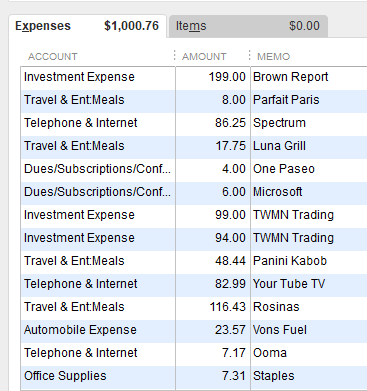
A month's worth of expenses, imported in one pass instead of typed line by line.
There had to be a better way using Claude.
The obvious solution — an MCP — wasn't available
Since I started my consulting business in 2003, I started my accounting journey using QuickBooks Desktop. There was no QuickBooks Online yet. As such, there's no MCP for QuickBooks Desktop — and since Intuit has dropped support for QuickBooks Desktop, none is likely coming.
Leverage the QuickBooks import capability
As an alternative, I found that I could generate a QuickBooks IIF file that would create expense entries in QuickBooks Desktop, ready to import.
A QuickBooks IIF file (Intuit Interchange Format) is a text-based, tab-delimited file format used to import and export data between QuickBooks Desktop and other applications.
Common uses. Organizations often use IIF files to:
- Import journal entries
- Import invoices
- Import bills
- Import checks
- Import customer lists
- Import vendor lists
- Import chart of accounts data
- Export accounting data for analysis
What it actually does
I drop a scanned version of my monthly Wells Fargo Business Visa statement — a PDF — into a folder and ask Claude to process it. Claude reads every transaction on the statement, pulls out the amount and the merchant, and builds a QuickBooks IIF file — the specific import format QuickBooks Desktop understands. I open QuickBooks, import the file, and every transaction from that statement is sitting in my books, correctly categorized, without me typing a single line.
Why this actually matters
An IIF file isn't just a spreadsheet — it has a specific structure QuickBooks expects, with the right headers, the right field order, the right formatting for dates and amounts. Getting that format right by hand isn't something a non-accountant wants to learn. Claude handles the formatting; I just review the output before I import it.
At first it barfed
The initial files didn't work. I sent screen captures to Claude, and Claude was able to figure out the problem. During the initial scan, Claude extracted individual transaction dates from the credit card statement and used those dates for the IIF file. That made QuickBooks barf — QuickBooks expects a single date for all the transactions in one expense entry. Claude identified that problem on its own. Once we made the dates of all the credit card transactions the same date, the import worked perfectly.
What changed for me
The monthly ritual of transcription is gone. What used to be real, tedious typing time is now a few minutes of reviewing a file Claude already built. And because I'm no longer manually retyping numbers from my credit card statement, the classic transcription mistakes — a transposed digit, a missed line item — don't happen anymore either. I still review the IIF file before I import it, to catch any edge cases.
The takeaway
This isn't a flashy AI demo — it's a genuinely boring and mundane task that used to eat one or two hours every month, now handled by Claude in the time it takes me to review a file. That's a pattern I keep running into: the biggest wins from Claude aren't the impressive one-off builds, they're the recurring, tedious tasks that quietly disappear. The biggest benefit: I no longer dread inputting my credit card transactions each month.